

Apple will not accept a hundred identical apps with different logos. That one rule decides which builders are worth looking at.
A brand we spoke to had paid for an app, waited six weeks, and then watched it get rejected twice. The app worked. It opened, it showed the catalogue, it took payments. Apple rejected it anyway, because of a rule about who was allowed to submit it and how much of it had been generated from a template.
That rule catches a lot of people, and almost nobody reads it before they buy. So before anything else about features and pricing, it is worth knowing what the two app stores will and will not accept, because that decides whether the thing you are paying for can ever reach a customer.
What an ecommerce mobile app builder actually is
An ecommerce mobile app builder turns an existing online store into iOS and Android apps without anyone writing the app from scratch. Your catalogue, prices, stock and orders stay in one place, and the app reads from them. You pick colours, a logo, a home screen layout and a navigation bar, and the builder produces the two binaries that go to the App Store and Google Play.
The category covers a wide range. At one end sits a tool that wraps your website in a browser frame and calls it an app. At the other sits a platform that ships genuinely native apps for buyers, for your sellers and for your delivery team, with push notifications, offline handling and device features. Both get described with the same words on a pricing page, which is why the checks further down matter.
The three ways a brand gets an app
Building it yourself with an agency or an in-house team gives you full control and the full bill. You own the code. You also own every OS update, every store policy change and every crash report, forever. For most ecommerce catalogues this is a large amount of money spent rebuilding something that already exists.
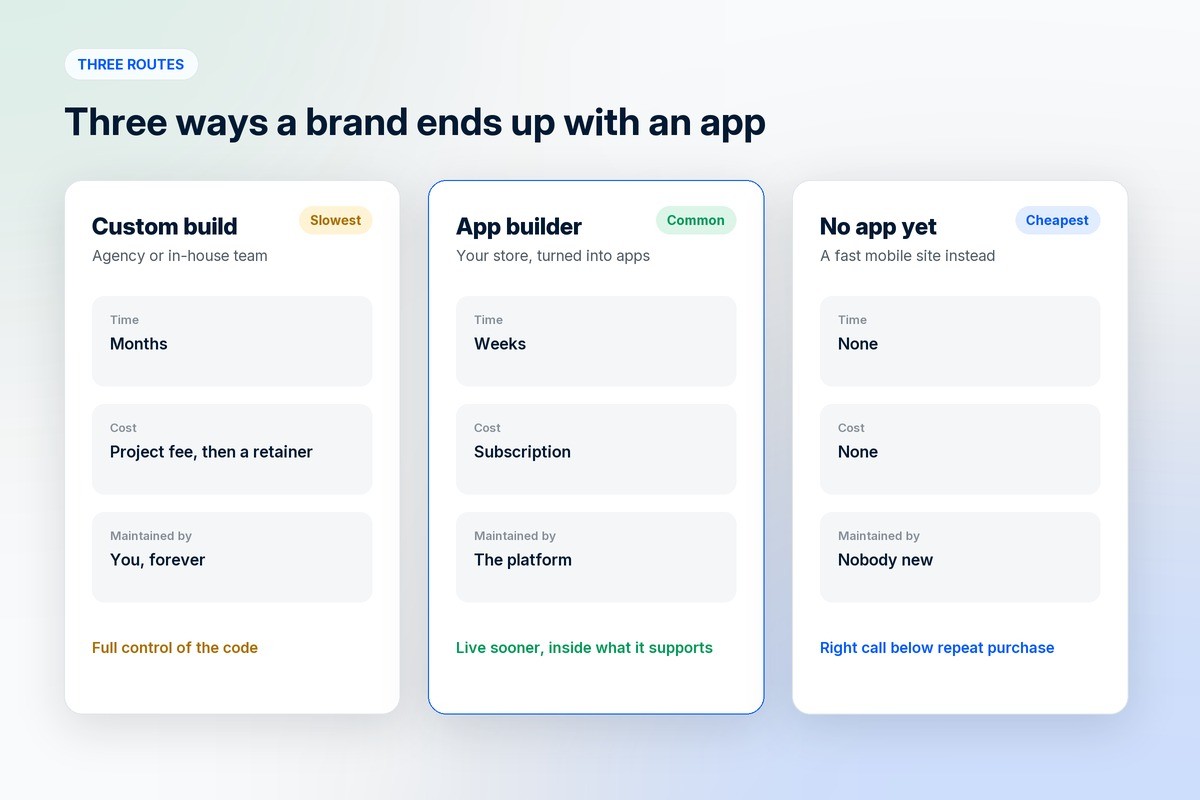
Using an app builder gets you to a published app in weeks rather than quarters, at a subscription instead of a project fee. The trade is that you work inside what the platform supports.
Not building one yet is a real option, and for a lot of brands it is the right call. An app earns its keep on repeat purchases. If most of your customers buy once a year, a fast mobile website will serve them better than an icon they install and never open.
The App Store rule that decides whether you can publish at all
Apple's App Store Review Guidelines, section 4.2.6, say that apps "created from a commercialized template or app generation service will be rejected unless they are submitted directly by the provider of the app's content." The same clause says these services "should not submit apps on behalf of their clients and should offer tools that let their clients create customized, innovative apps that provide unique customer experiences."
Read that twice before you sign anything, because it has two practical consequences.
The app has to be submitted from your own developer account, under your brand, by you or by someone acting inside your account. A builder that offers to publish everything under its own umbrella account is describing a setup Apple's guideline specifically rules out.
The app also has to be customised rather than stamped out. A hundred identical apps with different logos is the pattern the rule exists to stop. Ask the vendor how much of the app you can change, and ask to see two of their live apps side by side in the store. If they look like the same app twice, you have your answer.
Beyond a repackaged website
The second rule is shorter and catches more apps. Apple's guideline 4.2 on minimum functionality says your app "should include features, content, and UI that elevate it beyond a repackaged website", and that if it is not "particularly useful, unique, or 'app-like,' it doesn't belong on the App Store".
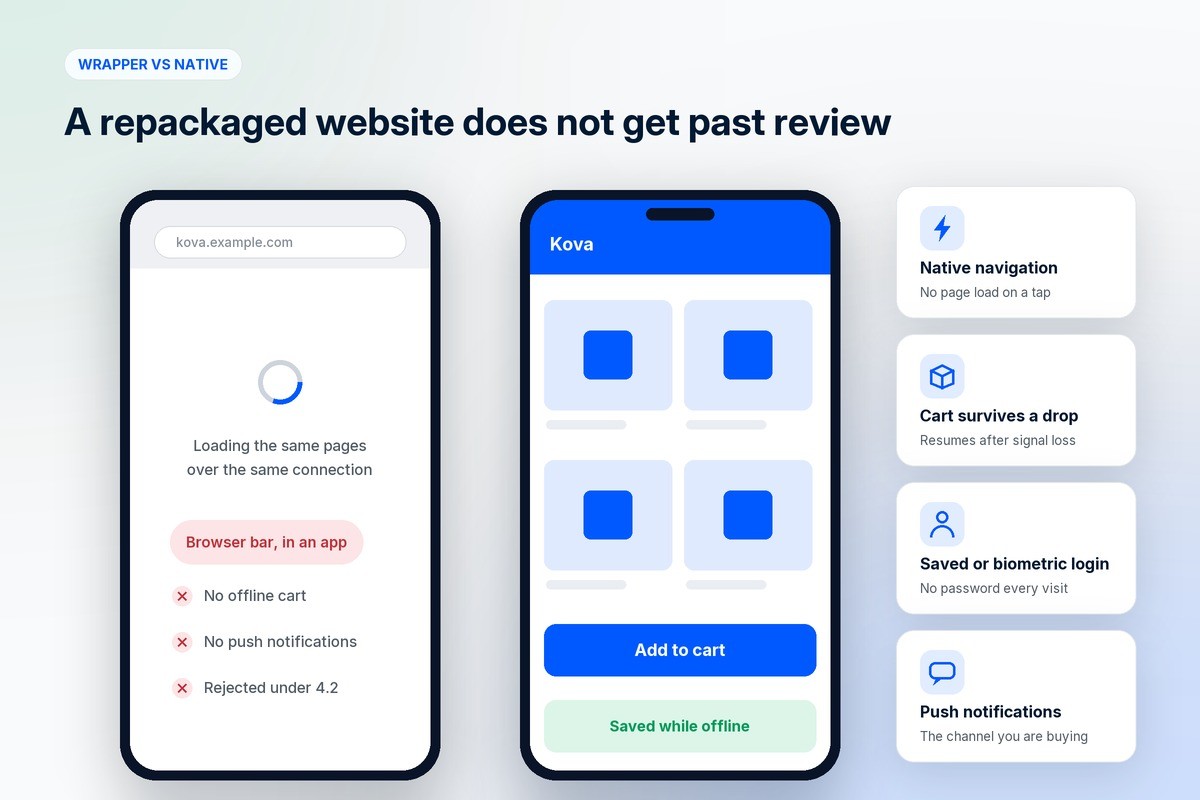
That is the rule a webview wrapper runs into. If the app is your mobile site inside a frame, there is nothing in it that the browser did not already do, and review can reject it on that basis alone. Worse, you will have spent money to give customers a slower version of your website, since a wrapper usually loads the same pages over the same connection with an extra layer on top.
What makes an app app-like is unglamorous: native navigation that responds instantly, a cart that survives a dropped connection, biometric or saved login, camera access where it is useful, and push notifications. Those are also the things a customer notices.
Who owns the listing, the code and the customers
Three ownership questions decide what happens when you leave.
The developer account. The listing, the reviews, the ratings and the download history live in whichever account published the app. If that is the builder's account, those assets are theirs, and migrating means a new listing with zero reviews.
The branding. Check that your name is on the icon, the splash screen, the store listing and the push notifications. Some platforms put their own name in the app title or the notification sender, which is the mobile equivalent of a marketplace keeping your buyer anonymous.
The customer data. Phone numbers, order history and push tokens should be exportable in a format you can take elsewhere. Ask for a sample export before you sign, not after.
What it actually costs
The store fees are fixed and public. Apple charges a $99 annual membership for the Apple Developer Program. Google charges a US$25 one-time registration fee for a Play Console account. Those two are yours regardless of who builds the app.
The builder charges a subscription, usually bundled with the storefront. The number that varies most between vendors is what happens on top of it: a percentage of your order value, a charge per push notification, a fee for each app update, or a separate price for the second platform. Add those up at the order volume you expect in a year, rather than the one you have today.
The cost people forget is maintenance. Apple and Google change requirements every year, and an app that is not resubmitted goes stale and eventually gets pulled. With a builder this is included and invisible. With a custom build it is a retainer you pay forever, and it is usually the line that kills the project in year two.
Push notifications are the reason to do this at all
Email gets filtered. Ads get more expensive every quarter. A push notification lands on a home screen for free, to a customer who has already installed your app and agreed to hear from you.
That is the actual business case. Not the app itself, which is a nicer way to browse, but the direct channel attached to it. A brand with ten thousand installs has a list it can reach on a Tuesday afternoon without paying anyone for the privilege.
It is also the thing most easily ruined. Notifications that arrive daily with another discount get switched off, and once a customer turns them off there is no second chance. Treat the permission as a finite resource. Order updates, back-in-stock alerts and genuinely new products earn their place; a sale every weekend does not.
A checklist before you sign up
Ask for the live app, not the demo. Download two apps the vendor has already shipped and use them for ten minutes on your own phone.
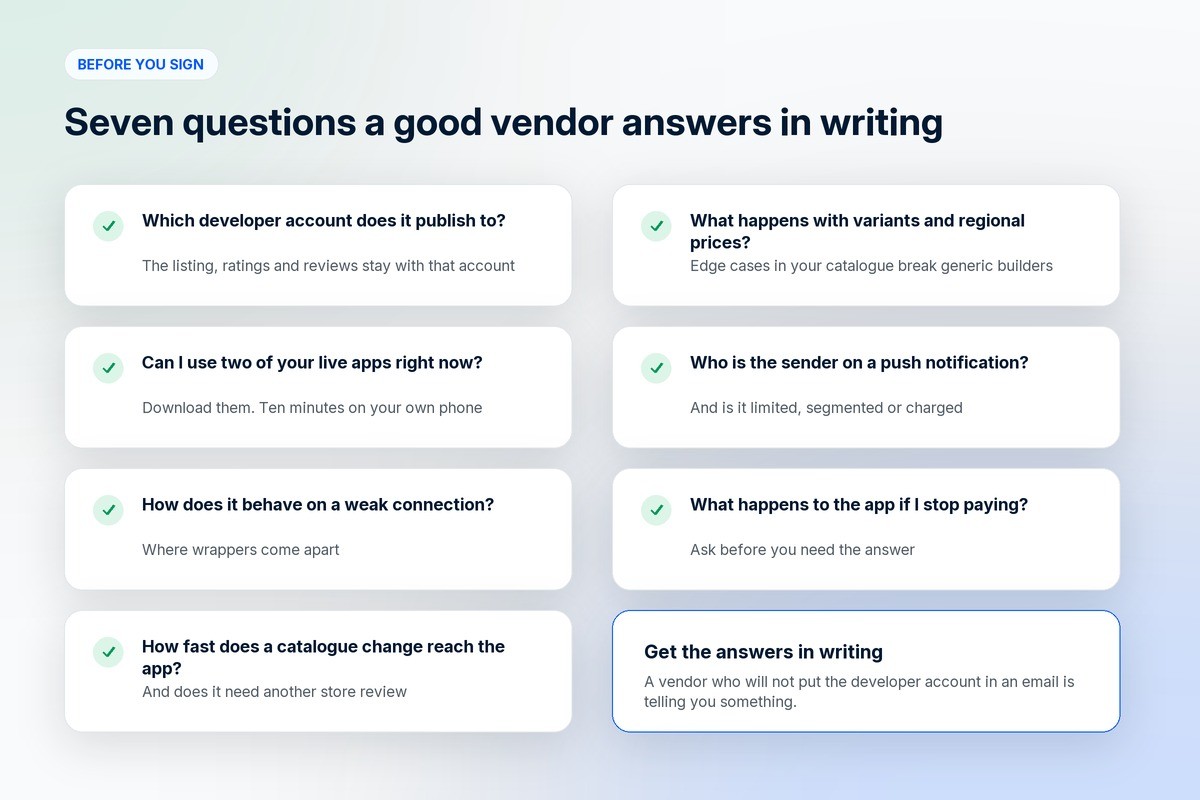
Check which developer account it publishes to, and get the answer in writing.
Open the app on a weak connection. This is where wrappers fall apart.
Ask how long a catalogue change takes to appear in the app, and whether an app update needs store review.
Ask what the app does when your product has variants, your prices differ by region, or a customer pays part in store credit. Edge cases in your catalogue are where generic builders break.
Check push notifications: whether you can segment them, whether they are limited or charged, and whose name appears as the sender.
Ask what happens to the app if you stop paying.
When you should not build an app yet
If your mobile site is slow, fix that first. An app will not rescue a checkout that takes nine seconds to load; it will just hide the problem from the people who have not installed it, which is almost everyone.
If you have fewer than a few thousand returning customers, your install base will be too small for notifications to matter, and the app will look empty in the store. Spend the money on getting repeat purchases first, then build the app for the people who already come back.
If your catalogue changes rarely and your customers buy once, an app adds a step rather than removing one.
How long it takes
With a builder, the build itself is days. Apple and Google review is where the calendar goes, and first submissions are slower than updates because the account, the privacy declarations and the screenshots all get checked for the first time.
Plan for a few weeks from decision to live listing, and do not announce a launch date until the first version has cleared review once.
Frequently asked questions
What is an ecommerce mobile app builder?
It is a tool that turns an existing online store into iOS and Android apps without custom development. The catalogue, prices and orders stay in your store, the app reads from them, and the builder produces the versions you publish to the App Store and Google Play.
Why would an ecommerce brand need a mobile app?
Mainly for repeat customers and push notifications. An app gives you a direct channel to people who already buy from you, without paying a platform each time you want to reach them. For a brand whose customers buy once and never return, it is rarely worth it.
How do I choose an ecommerce mobile app builder?
Download apps the vendor has already published and use them on your own phone. Confirm the app is published under your developer account, check that the branding is yours everywhere, test it on a weak connection, and price the subscription with every per-order and per-notification charge added in.
Who submits the app to the App Store?
You do, from your own developer account. Apple's guideline 4.2.6 says apps built from a commercialised template or app generation service are rejected unless submitted directly by the provider of the app's content, and that such services should not submit on behalf of clients.
When is a mobile app worth building for an online store?
Once you have a base of returning customers and a mobile site that already works properly. An app multiplies an existing relationship rather than creating one, so the return comes from repeat purchase rates, not from new customer acquisition.
Where do the app store costs come from?
From the two platforms directly. Apple charges a $99 annual Apple Developer Program membership and Google charges a US$25 one-time Play Console registration fee. Anything beyond those comes from your builder, so ask for the full list before you commit.
Where to go from here
If you are weighing an app against a better mobile site, the trade-offs are in why an online store is important. If you are deciding between running everything yourself and using a platform, there is how white-label ecommerce platforms are helping local businesses.
1D2C builds the storefront and the apps as one thing. A branded buyer app for Android and iOS, a seller app for vendors, and a rider app for whoever delivers, all reading from the same catalogue and orders, under your name rather than ours. Plans are on the pricing page, with Android and iOS arriving at different tiers. Everything it includes is on our ecommerce app builder page.
Apple's guidelines 4.2 and 4.2.6, the Apple Developer Program fee and the Google Play registration fee were checked on Apple's and Google's own pages in October 2026. Store policies change, so read the current versions before you plan a launch.