
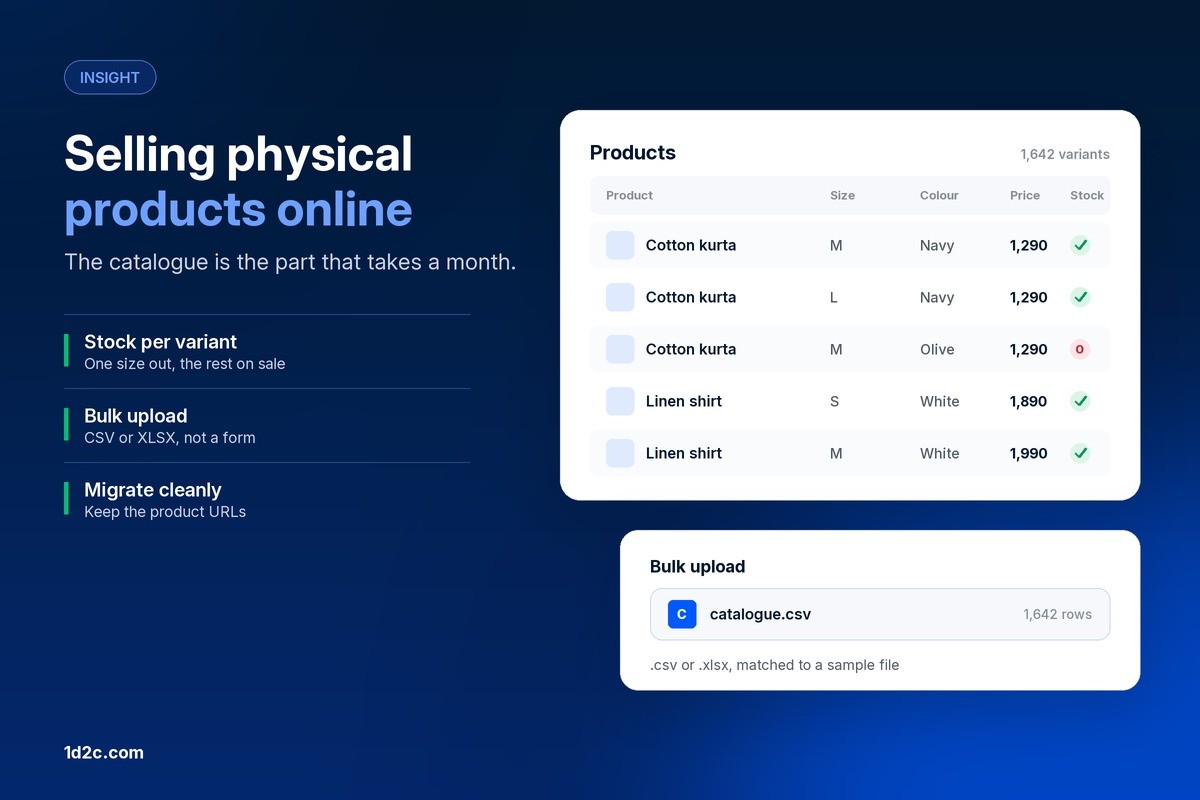

The store design takes an afternoon. The catalogue takes a month, and the catalogue is what customers actually use.
Forty products. Five sizes, four colours, two fabrics. That is 1,600 rows in a spreadsheet, and somebody has to type the price into every one of them.
This is the part of selling physical products online that nobody writes about. The store design takes an afternoon. The catalogue takes a month, and it is the catalogue that decides whether a customer finds the thing they wanted in their size and buys it, or gives up on the third tap.
What follows is about the stock itself: where it comes from, how it gets into a store, and what breaks when there is a lot of it. For the surrounding steps, payments, shipping setup, first customers, we wrote a separate guide on how to sell online.
What makes physical products different
A digital product has one version, infinite stock and no weight. Physical goods have four properties that shape everything else about the store.
They run out. Stock is a number that changes with every order, and showing something as available when it is not produces a refund and a bad review.
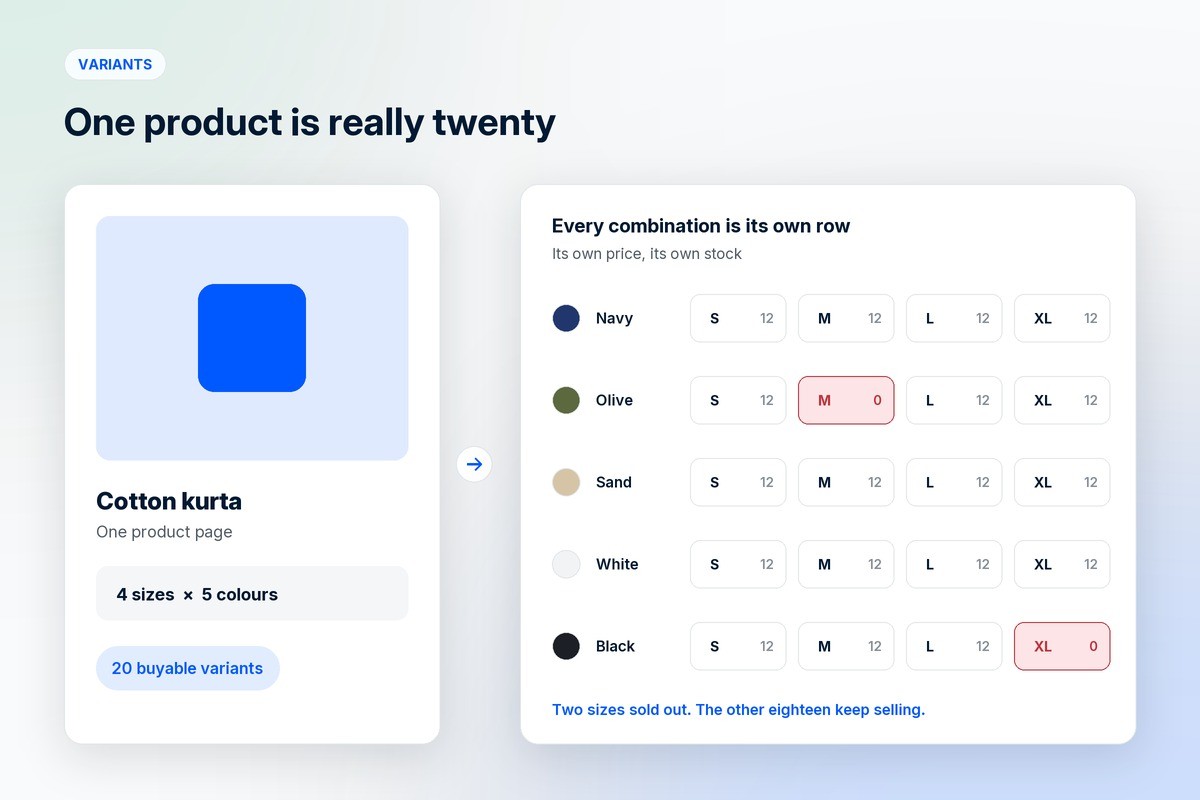
They come in versions. One shirt is really twenty products wearing the same name.
They weigh something. Weight and size decide shipping cost, which decides whether your margin survives the delivery.
They come back. Returns are a cost of selling clothing and shoes rather than an exception, and the policy has to be priced in from the start.
Sell your own products, or find products to sell
There are four common routes to having something to sell, and the real difference between them is how much margin and control you keep.
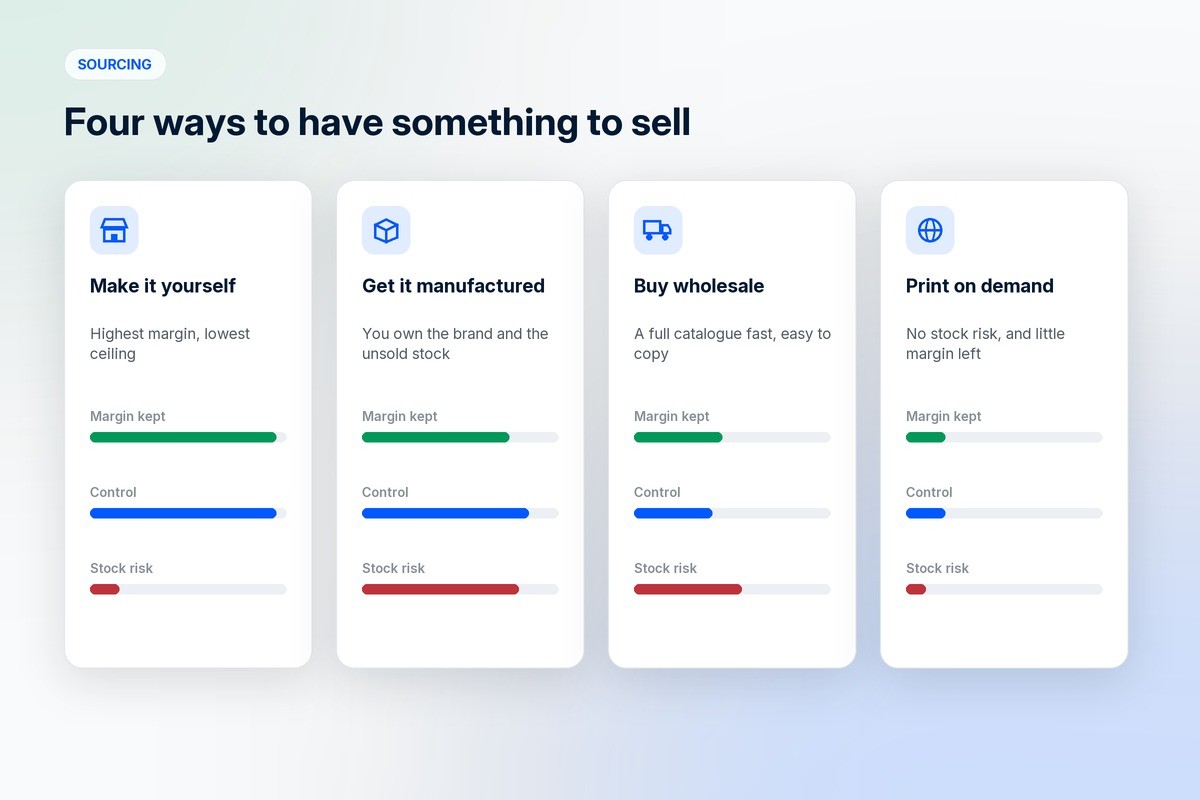
Making it yourself gives you the highest margin per unit and the lowest ceiling. Every unit costs you hours. This works beautifully for candles, jewellery, soap and baked goods up to the point where demand passes what two hands can produce, and then it becomes a manufacturing decision whether you planned one or not.
Getting it manufactured means a factory, a minimum order quantity and money paid before anything sells. You own the brand and the margin. You also own whatever did not sell, which is why the first production run should be smaller than your optimism suggests.
Buying wholesale and reselling is the fastest way to a full catalogue and the easiest to copy. If the same goods are available to everyone, the only things you can compete on are service, curation and the reason someone buys from you rather than a marketplace.
Print on demand and dropshipping remove the stock risk and take most of the margin with it. Nothing is made until it is ordered, so you can test twenty designs for the cost of the listing. Shipping times and quality are a supplier's decision, and the customer blames you for both.
Most brands end up mixing these. A few own-manufactured hero products, a wider range bought in, and print on demand for the things that are hard to forecast.
Your catalogue is the storefront
Customers do not browse a homepage. They search, they filter, they land on a product page from an ad or a Google result. The catalogue is the store, and the parts people skip are the parts that do the work.
Categories decide what the filters can do. If size, colour, material and fit are not separate fields, nobody can narrow a hundred results down to the four they would buy.
Titles decide what gets found. "Cotton kurta, straight fit, navy" is a search result. "The Aanya" is a product nobody is looking for.
Descriptions answer the objection. Measurements, fabric weight, what it fits, how it washes. Every question you do not answer becomes an abandoned cart or a message you have to reply to.
Images decide the click. The first photograph sells the category page, and the rest of them sell the detail.
Variants are where catalogues break
A variant is one buyable version of a product: this shirt, in medium, in navy. Variants multiply, which is why a catalogue of forty products becomes a spreadsheet of sixteen hundred rows.
Three rules keep that under control.
Give every variant its own stock number. Medium navy selling out does not mean large navy has. A store that tracks stock at the product level will cheerfully sell you a size it does not have.
Give every variant its own price where it needs one. A larger size that costs more to make, a bundle, a different unit size for groceries. In 1D2C each price variant carries its own price, its own discounted price, its own unit and its own in-stock state, so the product page can show one row as unavailable without hiding the rest.
Give every variant a SKU you can read. Not the one the system generated. KUR-NVY-M tells a person packing an order what to pick; a thirty-character identifier does not.
The restraint matters as much as the structure. Every option multiplies the rows you maintain, the stock you hold and the chances of showing the wrong price. Drop the options nobody buys after a season.
Getting thousands of rows in
Typing a catalogue into a form works for twenty products. Past that, the work belongs in a spreadsheet and a file upload.
The 1D2C admin takes a .csv or .xlsx file for bulk product uploads, with a sample file you download first so your columns match what the importer expects, and separate paths for adding new data and updating what is already there. The update path is the one that matters in month two, when you need to change prices across four hundred products before a sale.
The habit worth forming on day one: keep the master catalogue in a spreadsheet, treat the store as a copy of it, and make the price change in the sheet before you make it in the store. Teams that edit prices in the admin and nowhere else lose track of what the price is supposed to be within about six months.
What breaks in a CSV import
Every import failure is one of a handful of things, and they look like data corruption rather than formatting.
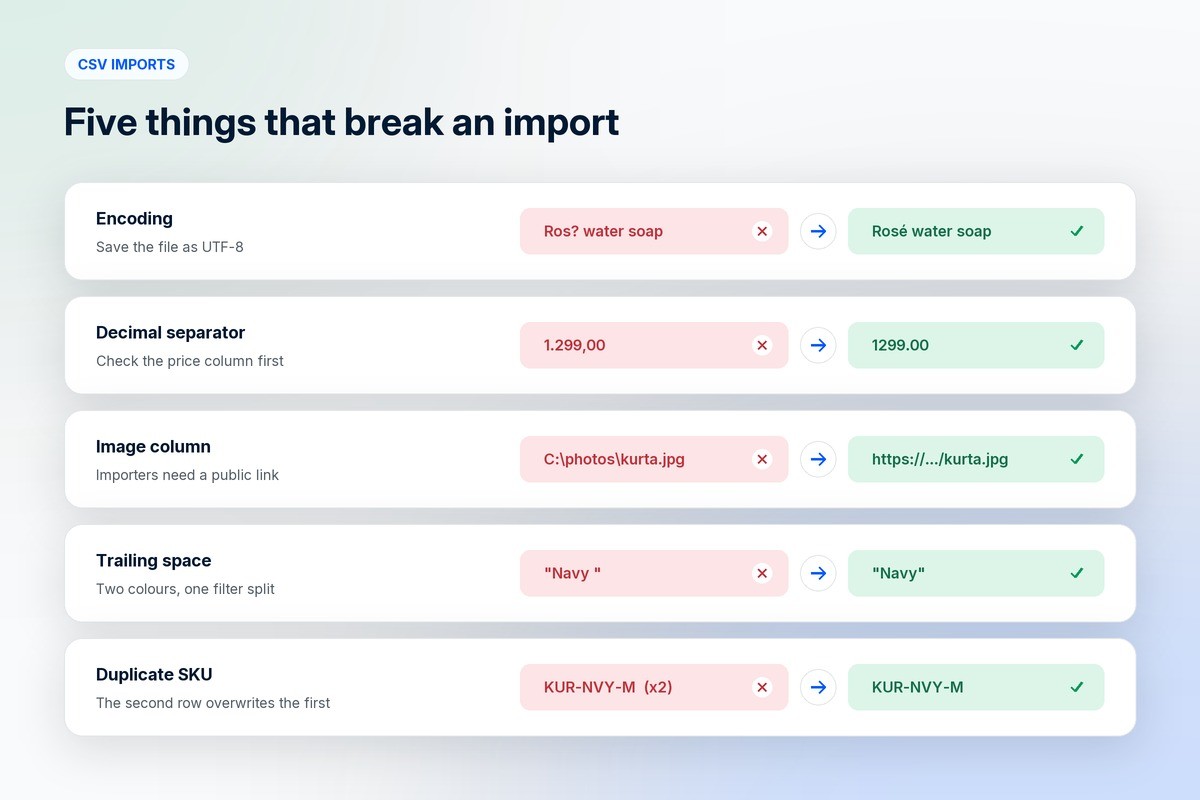
Encoding. A file saved in the wrong encoding turns accented characters, currency symbols and Indic text into question marks. Save as UTF-8 and check one row with a special character before uploading the rest.
Decimal separators. A spreadsheet set to a locale that writes 1.299,00 will produce prices that land as 1.299 or get rejected. Check the price column after the first upload, not after the first order.
Image columns. Importers want a public link to each image, not a file on your laptop. If images are the slow part, upload them somewhere reachable first and put the links in the sheet.
Trailing spaces. "Navy " and "Navy" become two colours, which quietly splits a filter into two options that each look half empty.
Duplicate identifiers. If two rows carry the same SKU or handle, the second usually overwrites the first, and you find out when a product goes missing.
The fix for all of these is the same. Import twenty rows first, open the store, check a product with variants and a product with an accent in its name, then import the rest.
Migrating a catalogue you already have
Moving a catalogue between platforms is mostly a mapping exercise, and the risk is not the products.
Export everything from the old platform first and keep that file untouched. It is your backup, and it is the only thing that tells you what the catalogue looked like before anyone started fixing it.
Map the fields on paper before you touch an importer. Old column, new column, and a note for every field that has no home on the other side. Options and custom fields are where the mismatches live.
Move the products, then the images, then the customers and orders. Orders usually matter less than people expect and customers usually matter more, since an email list and a push audience are harder to rebuild than a product page.
Keep your URLs. This is the part people forget and the only one that costs traffic. If a product lived at a particular address and Google has been sending people there for two years, the new store needs that address to resolve, either at the same path or through a redirect. A migration that changes every product URL without redirects reads to a search engine as a site that deleted its catalogue.
Then test twenty products by hand. Price, variants, stock, images, the add-to-cart. Twenty products tell you almost everything a thousand would.
Stock, weight and returns
Three numbers decide whether a physical product makes money, and none of them appear on the product page.
Stock held is money sitting still. A catalogue that looks impressive and turns over twice a year is worse than a narrow one that turns over monthly.
Weight and dimensions set the shipping bill. Work out the delivered cost of your average order before you set a free shipping threshold, not after. Most thresholds are chosen because a competitor picked that number.
Returns have a rate per category, and yours is whatever yours turns out to be. Track it from the first month and read the reasons. A size chart that is wrong shows up in the return reasons long before it shows up anywhere else.
Before you add the thousandth product
A big catalogue is not automatically an asset. Past a few hundred products, maintenance becomes the job: photographs that match, prices that are current, stock that is right, descriptions nobody has read in a year.
Before a catalogue grows, make sure search and filters work on what is already there, that a product with no stock behaves sensibly rather than disappearing, and that one person can update a price everywhere in under a minute.
If any of those is missing at a hundred products, it will be unmanageable at a thousand.
Frequently asked questions
What does it take to sell physical products online?
Something to sell, a store that holds a catalogue with stock and variants, a payment method, and a way to deliver and accept returns. The catalogue is the part that takes the longest, because every product needs photographs, a title, a description, a price and a stock number for each version of it.
Why is the catalogue more work than the store design?
Because a store design is built once and a catalogue is maintained forever. Prices change, stock moves, products are added and retired. A theme is an afternoon; keeping four hundred products accurate is a weekly job, and it is the part customers actually interact with.
How do I add thousands of products to an online store?
Through a bulk upload rather than a form. The 1D2C admin accepts .csv and .xlsx files and gives you a sample file to match your columns to, with one path for importing new products and another for updating products that already exist. Import a small batch first, check it, then run the rest.
Who should sell their own products rather than source them?
Anyone whose product is the reason customers come. Making or manufacturing your own keeps the margin and the brand with you. Sourcing or print on demand suits a wide range, an untested idea or a catalogue where the curation is the value rather than the item.
When should I move my catalogue to a different platform?
When the current one limits something you need, such as variants, per-seller pricing, apps or the cost per order. Plan the move around a quiet trading week, export everything first, and keep the old product URLs working.
Where do product variants come from in an online store?
From the options a product has: size, colour, material, unit size. Each combination becomes a variant with its own price and stock. In 1D2C each price variant carries its own price, discounted price, unit and in-stock state, so one size can sell out without affecting the others.
Where to go from here
For the steps around the catalogue, there is our guide on how to sell online. If you are still choosing what to sell, we listed ecommerce business ideas with their margins and difficulty. If you are deciding where to build, read why an online store is important and the comparison with Shopify.
1D2C is built for catalogues with real stock behind them. Price variants with their own price, discount, unit and stock state, bulk upload from .csv or .xlsx with a sample file to match, per-seller pricing for marketplaces, and the buyer, seller and delivery apps reading from the same catalogue. Plans are on the pricing page.
The 1D2C import formats and variant behaviour above are from the current product. Everything else is general practice rather than a platform claim, and the specifics of any migration depend on what the platform you are leaving will export.


