

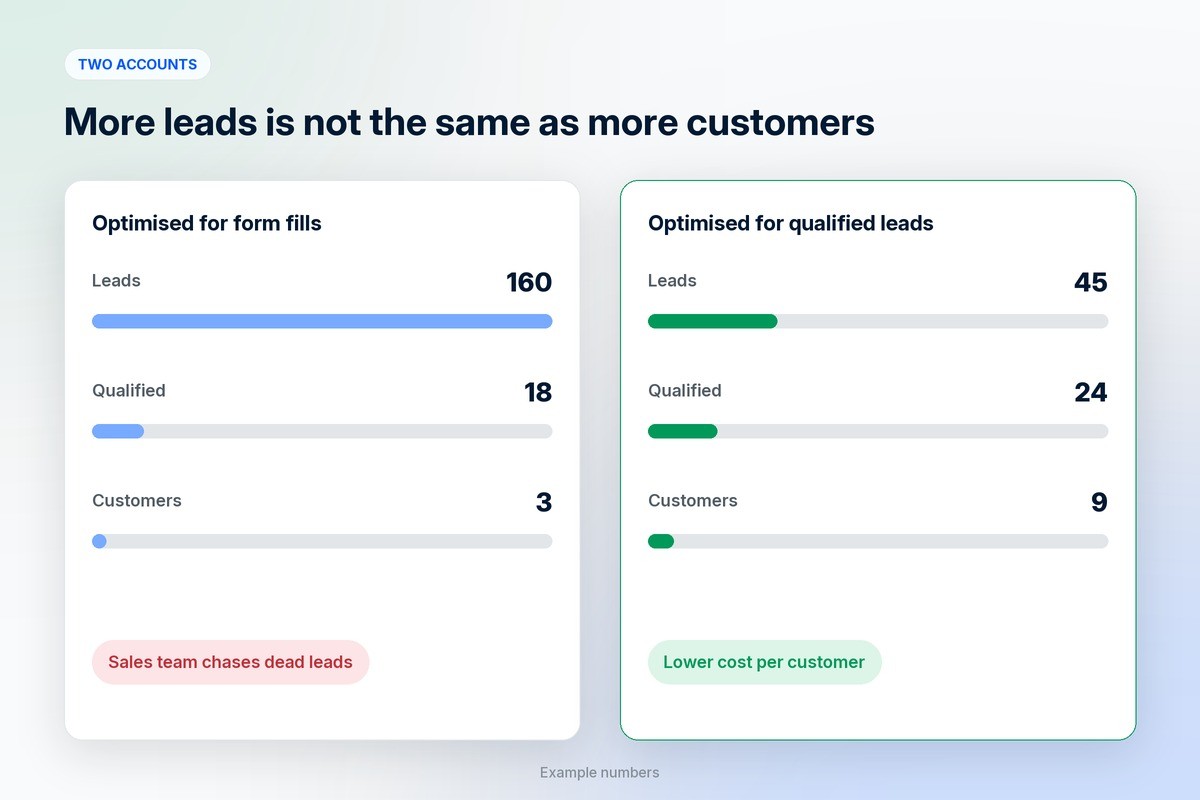
A cheap lead that never answers the phone costs more than an expensive one that signs. Most Google Ads accounts are set up to chase the cheap ones.
An interior design studio in Pune was getting forty leads a week from Google Ads and was thrilled for about a fortnight. Then the sales team started calling. One person wanted a free quote for painting a single wall. Another was a student researching a college project. Several did not remember filling in the form at all. By the end of the month the studio had spent its full budget and signed one client.
Lead quality in Google search ads is how many of the people who fill in your form are actually able and ready to buy from you. A cheap lead that never answers the phone costs more than an expensive one that signs. Most accounts are set up to chase the cheap ones, because by default Google is told that every form submission is a success.
Here are five changes that move an account from lots of low-intent leads to fewer leads that turn into customers. None of them need a bigger budget. A couple of them will make your lead count drop, and that is the point.
1. Clean up your search terms and add negative keywords
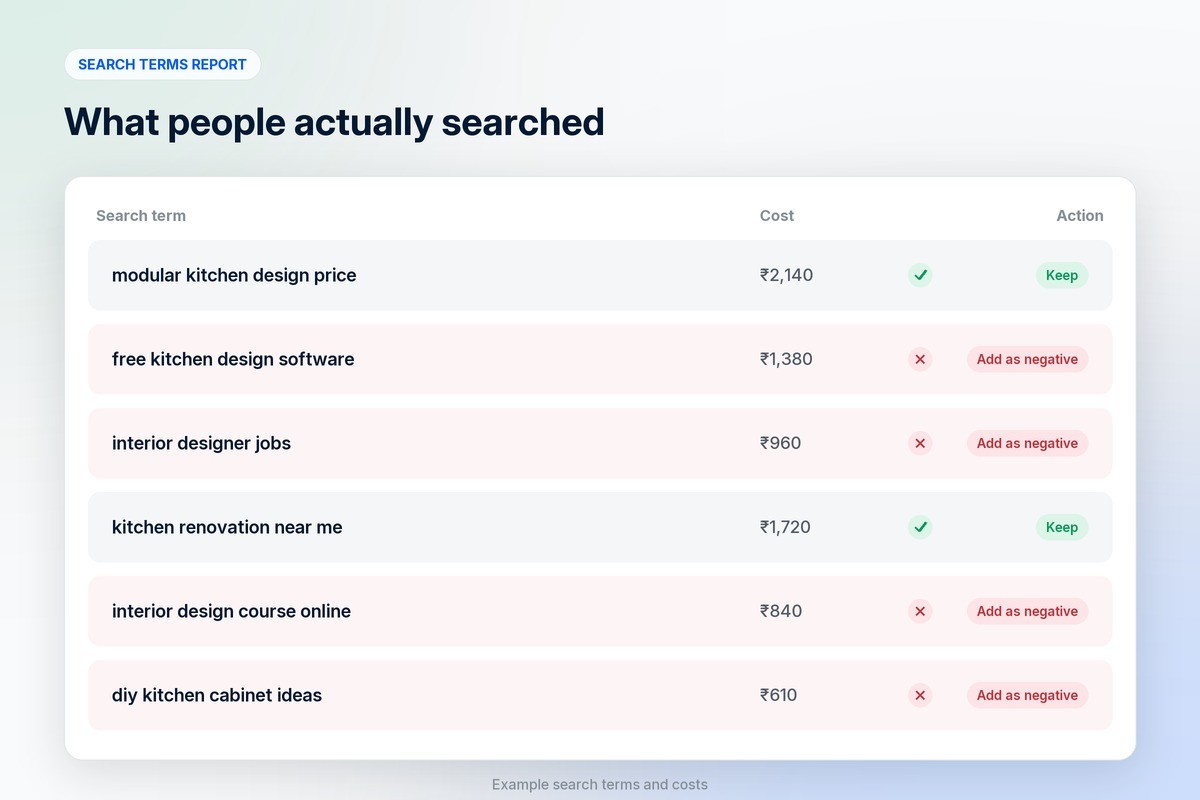
Your keywords are not what people searched. They are what Google decided was close enough. The search terms report, under Insights and reports in Google Ads, shows the real queries that triggered your ads, and it is usually the fastest way to find wasted money.
Open it and sort by cost. You will find searches with words like “free”, “jobs”, “course”, “salary”, “DIY”, “template” or a competitor’s name. Each one is a person who was never going to buy. Add those words as negative keywords, ideally in a shared list so every campaign uses them. Then make it a habit: fifteen minutes every week for the first few months, then every fortnight.
Match types matter here too. Broad match can find good searches you would never have thought of, but it needs strong conversion data to steer it (see point 4). Until your tracking is solid, phrase and exact match on your best keywords keep the ads close to what you actually sell.
2. Write ads that put off the wrong people
Most ad copy is written to get as many clicks as possible. For lead generation that is the wrong goal. You pay for every click, and every vague ad invites people who will fill in a form out of curiosity.
Put the qualifying details in the ad itself. A starting price (“Kitchens from ₹4 lakh”), a minimum order, who the service is for (“For restaurants and cafés”), the area you cover or how long the work takes. Someone looking for a free quote on one wall reads that and scrolls past, which costs you nothing. Someone who can afford you reads it and clicks with more confidence, because the ad has already answered their first question.
Your click-through rate may fall slightly. Your cost per qualified lead usually falls further.
3. Make the landing page and form do some filtering
A form that asks only for a name and phone number is easy to fill in, which is exactly the problem. Anyone can submit it, including people who tapped the wrong button.
Add one or two questions that a real buyer answers easily and a casual visitor does not bother with: budget range, timeline, type of project, company size. Use dropdowns, not free text, so it stays quick on a phone. Then send each ad group to a page that matches the search. A person who searched for “modular kitchen design” should land on kitchens, with prices, past work and reviews, not on your home page.
Be careful with instant lead forms. Google’s lead form assets let people submit details without leaving the search results, often prefilled from their Google account. They produce a lot of leads cheaply, and in many accounts a large share of them are people who did not mean to submit. If you use them, add qualifying questions and judge them by sales, not by volume.
4. Tell Google which leads turned into sales
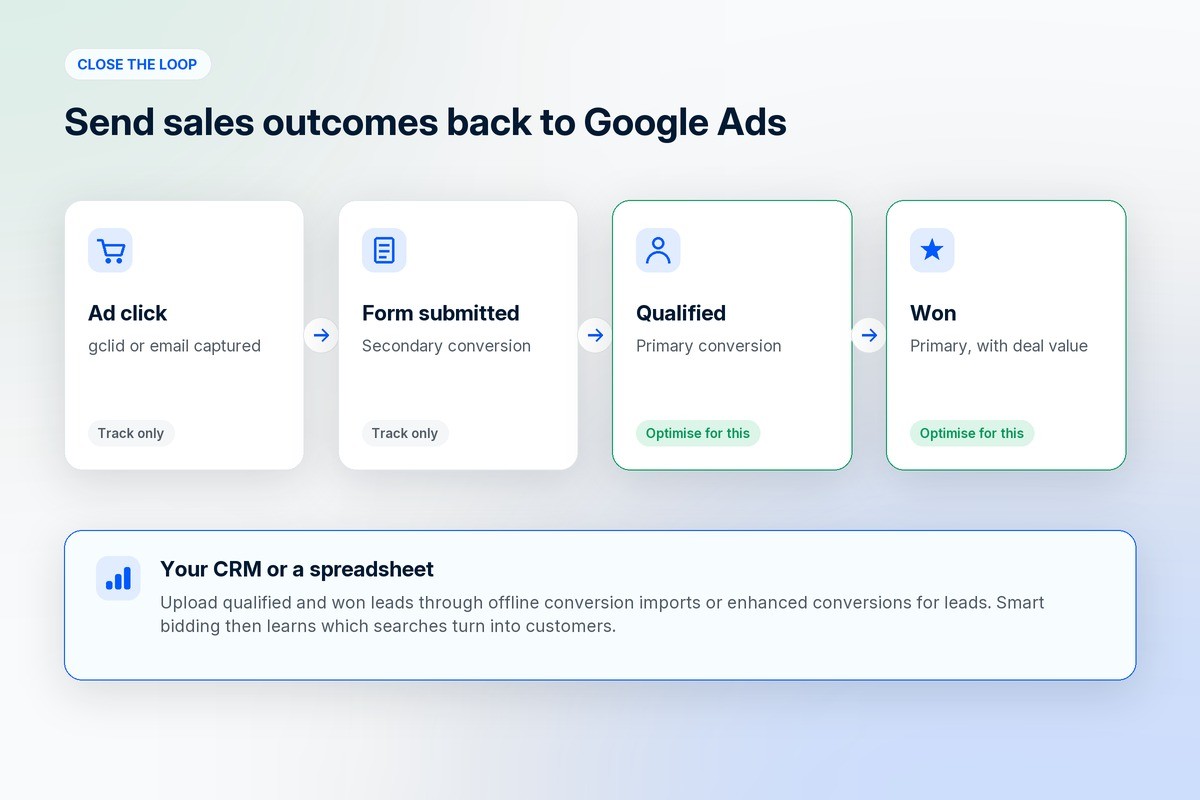
This is the change that makes the biggest difference, and the one most accounts skip. If your only conversion is “form submitted”, smart bidding learns to find people who submit forms. It has no idea which of them bought, so it goes after the cheapest submissions it can find.
Fix it by sending your sales outcomes back into Google Ads. Google supports this through offline conversion imports and enhanced conversions for leads, which match the leads in your CRM, or even a spreadsheet, to the clicks that produced them. Mark the stages that matter, such as “qualified” and “won”, as primary conversions, and give them values if your deals vary in size.
Then switch your bidding to optimise for those stages. It takes a few weeks for the system to relearn, and you need a steady flow of qualified leads (a few dozen a month is a sensible minimum) for it to work. After that, Google is bidding for buyers instead of form-fillers, and broad match becomes much safer to use.
5. Tighten location, schedule and network settings
Some low-quality leads come from settings that were never changed after the campaign was created.
Location is the big one. By default, Google can show your ads to people who are only interested in your area, as well as people who are actually there. A plumber in Manchester does not need clicks from someone in another country reading about Manchester. Under location options, choose “Presence: people in or regularly in your included locations”.
Then check the networks. New search campaigns often include the Search Partners and Display networks, which bring cheaper clicks and usually weaker intent. Turn them off, measure for a month, and only add them back if the qualified-lead numbers justify it. Finally, look at the hour-of-day report. If leads that arrive at 2am never pick up the phone, lower your bids or pause the ads during those hours.
One more thing: call leads back quickly
The best lead in the world goes cold if nobody calls for two days. Someone searching for a service is usually comparing two or three businesses, and the first one to reply has an advantage. Set up alerts, or a WhatsApp message that goes out the moment the form is submitted, so the buyer hears from you while they are still looking. We wrote about how that works in WhatsApp integration for ecommerce.
Frequently asked questions
Why are my Google Ads leads low quality?
Usually because the account is optimising for form submissions rather than sales. Broad keywords, missing negative keywords, vague ad copy, short forms and default location settings all add to it. Start with the search terms report and your conversion tracking.
Should I use instant lead forms in Google Ads?
They can work, but they often bring a high share of people who submit without real intent. If you test them, add qualifying questions and judge them by how many leads become customers, not by cost per lead.
How long does it take to improve lead quality?
Negative keywords and ad copy changes show results within a week or two. Switching bidding to qualified-lead conversions takes longer, usually a few weeks, while Google relearns who to target.
Will fewer leads mean fewer sales?
Not if the leads you cut were never going to buy. Most accounts that tighten targeting see fewer leads, a lower cost per sale and a sales team that spends its time on people who answer.
Do I need a performance marketer to fix this?
You can do the first three steps yourself. Conversion imports and bid strategy changes are where an experienced performance marketer or digital marketing service saves you weeks of trial and error.
Where to go from here
Search ads are one part of a wider plan. For how they fit with SEO, content and social, see what digital marketing is. If you also run campaigns on Instagram and Facebook, the same rule applies there, and our guide to setting up Meta ads covers the tracking side. And if you would rather someone ran your online advertising for you, 1D2C’s marketing plans include managed Google and Meta campaigns. They are on the pricing page.