

A lead that costs ₹38 and never answers the phone is not a cheap lead. It is a rounding error you paid for, four hundred times.
Four hundred leads at ₹38 each reads like a good month. Then someone starts calling them. Two numbers are switched off. One belongs to a teenager who tapped the ad while scrolling. The fourth person asks what the call is about. By Friday the sheet says eleven real conversations and two sales, and the true cost per sale is around seven thousand rupees.
Nothing is broken in the ad account. The campaign was asked to collect the largest possible number of form submissions, and it did that well. The brief was wrong, not the delivery.
Lead quality is mostly a settings problem and a follow-up problem, and most of it can be fixed in an afternoon. Here are nine changes, roughly in the order we would make them.
1. Write down what a qualified lead is
Most teams argue about lead quality without ever defining it. Sales says the leads are rubbish. Marketing says sales is not calling them. Both are working from memory.
Pick one event further down your funnel and name it. A lead who answered the phone. A lead who asked for a quote. A lead who booked a demo or a site visit. For a D2C brand selling a considered product, it is usually the first real conversation, because that is the point where you can tell whether the person has money and a reason to buy.
Write the definition in one line and put it in your CRM as a stage. Everything else in this list depends on that one line existing, because you cannot optimise towards a target you have not described.
2. Switch the performance goal from leads to qualified leads
Inside the ad set, Meta asks what you want it to maximise. The default is Maximise number of leads, which shows your ad to the people in your audience most likely to hand over their contact details. That is a different group of people from the ones most likely to buy.

Meta lists a second goal, Maximise number of qualified leads, which shows the ad to people most likely to convert after sharing their information. There is also Maximise value of conversions, where you send a value with each lead and the system chases the expensive ones. The goals work with both instant forms and website forms.
This is one setting in one dropdown. It is also the single change that moves lead quality the most, and the one most accounts have never touched.
3. Send your sales outcomes back to Meta
The qualified leads goal only works if Meta learns which of your leads turned into something. That means connecting your CRM through the Conversions API and pushing the lead status back as it changes.
This is no longer optional. Meta's help centre says that from April 2026 the qualified leads goal is not available for new campaigns without a Conversions API integration, and that existing campaigns were affected from August 2026. Accounts that never set this up quietly lost access to the goal.
There is a published number attached to this. Lead ads using Conversions API for CRM with the qualified leads goal on instant forms saw 21% lower cost per quality lead compared with the volume goal, and website forms saw 9.5% lower.
One detail is easy to miss. During the learning phase, upload an event for every lead status update, not only for the ones that end in a sale. A lead marked unreachable teaches the system as much as a lead marked won.
4. Change the form type from more volume to higher intent
A new instant form defaults to More volume, which is built so that a person can submit it in about two taps. Two other types exist, and the one you want is Higher intent.
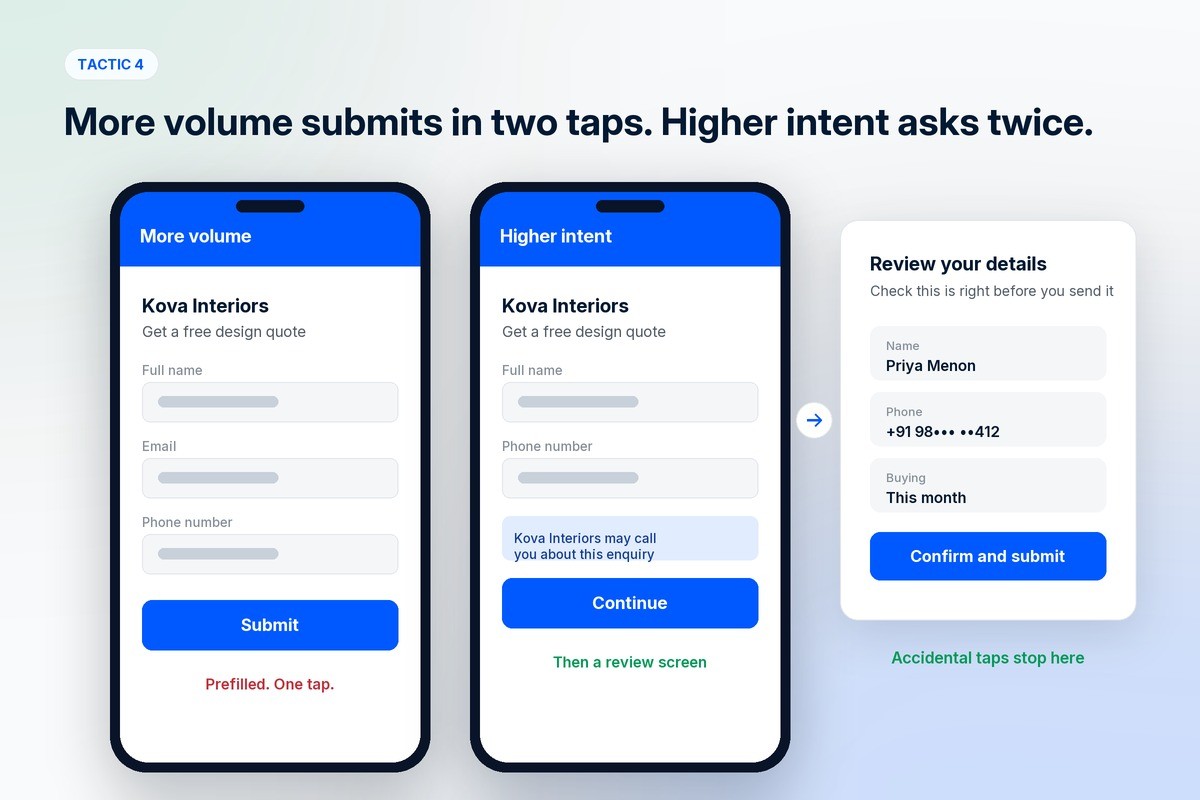
Higher intent adds a line under the contact fields saying the business may follow up, and an extra review screen where the person confirms what they typed before submitting. Those two small pieces of friction remove most of the accidental submissions, which is the whole point.
Two things to know before you switch. Your lead count will drop, sometimes by a lot, and that is the change working rather than failing. And higher intent forms only run on Facebook and Instagram feeds on mobile, so they do not appear on desktop at all.
5. Ask one question a casual browser will not answer
Prefill questions are answered for the person by Meta. Custom questions are not, which is exactly why they filter.
One good custom question is usually enough. Meta's own examples are blunt and practical: when are you looking to evaluate a service, when do you plan to switch, which model are you interested in, how many employees does your company have. Pick the one that separates a buyer from a browser in your category. Budget range works for services. Timeline works for anything with a decision cycle. Pincode works when you only deliver or install in some places.
If your catalogue is wide, conditional answers let the later options change based on the earlier ones, so a person choosing a sofa never sees the colours you only stock in chairs. Ask one or two questions, not nine. A long form filters by patience, and patience is a poor proxy for intent.
6. Put the price in the ad
The cheapest filter in this list costs nothing and sits in the creative.
If your product starts at ₹14,000, say so in the ad. If you only work with brands shipping more than a hundred orders a month, say that. Every person who reads the price and keeps scrolling is a lead you did not pay for and a call your team did not have to make.
Brands resist this because it lowers the click-through rate, and a lower click-through rate looks like a worse ad in the dashboard. Judge it on the number of real conversations instead, which is the metric that was always being paid for.
7. Send considered purchases to a page, not a form
Instant forms win on speed. Someone can submit one without leaving the feed, which is why they produce cheap leads and why some of those leads barely remember filling anything in.
For a product people need to understand before they enquire, the landing page is doing useful work. The scroll is a qualification step. Someone who reads a page about a ₹60,000 treatment and then fills a form knows what they are enquiring about. The qualified leads goal works on website forms too, with a smaller reported gain, so you are not giving up the optimisation by moving off the platform.
Run both for a fortnight and compare on sales, not on cost per lead. Instant forms will win on cost per lead almost every time, and that is the number that misled everyone in the first place.
8. Answer while they still remember the ad
A lead decays fast. The person filled in a form between two reels, and ten hours later they have no memory of your brand.
Meta's own best practices are specific here. Capture leads through a connected CRM or the Leads Centre rather than downloading a spreadsheet, because the download delay costs you the follow-up window. Schedule the campaign to run during the hours your team can actually call. Use the appointment or custom question to learn when and how the person prefers to be contacted.
There is a deadline too: lead data is only available for download for up to 90 days after submission, so anything sitting in a spreadsheet you have not pulled is on a clock.
The best version of this is automatic. With a WhatsApp follow-up, the conversation starts the moment the form is submitted, while the ad is still on screen. Meta goes further and lets you optimise for it: choose the qualified leads goal with Meta as the signal source, then set Leads with WhatsApp conversations as the follow-up event, and delivery shifts towards people likely to chat with you rather than people likely to fill in a form and vanish.
9. Let it learn, then leave it alone
An ad set needs about 50 results in a week to exit the learning phase and deliver stably. Qualified leads are rarer than raw leads, so a campaign optimising for a deeper event needs a bigger budget behind fewer ad sets to reach that number.
This is where most accounts undo their own work. The budget is split across six ad sets, none of them gets to 50, and every one of them sits in learning forever. Then someone edits the audience on Wednesday, which resets learning again.
Fewer ad sets. One significant change at a time. Then wait two weeks before deciding anything, because results during the learning phase are unstable by definition.
How to tell whether it is working
Cost per lead will go up after these changes. Expect it, and tell whoever reads the report before you make them.
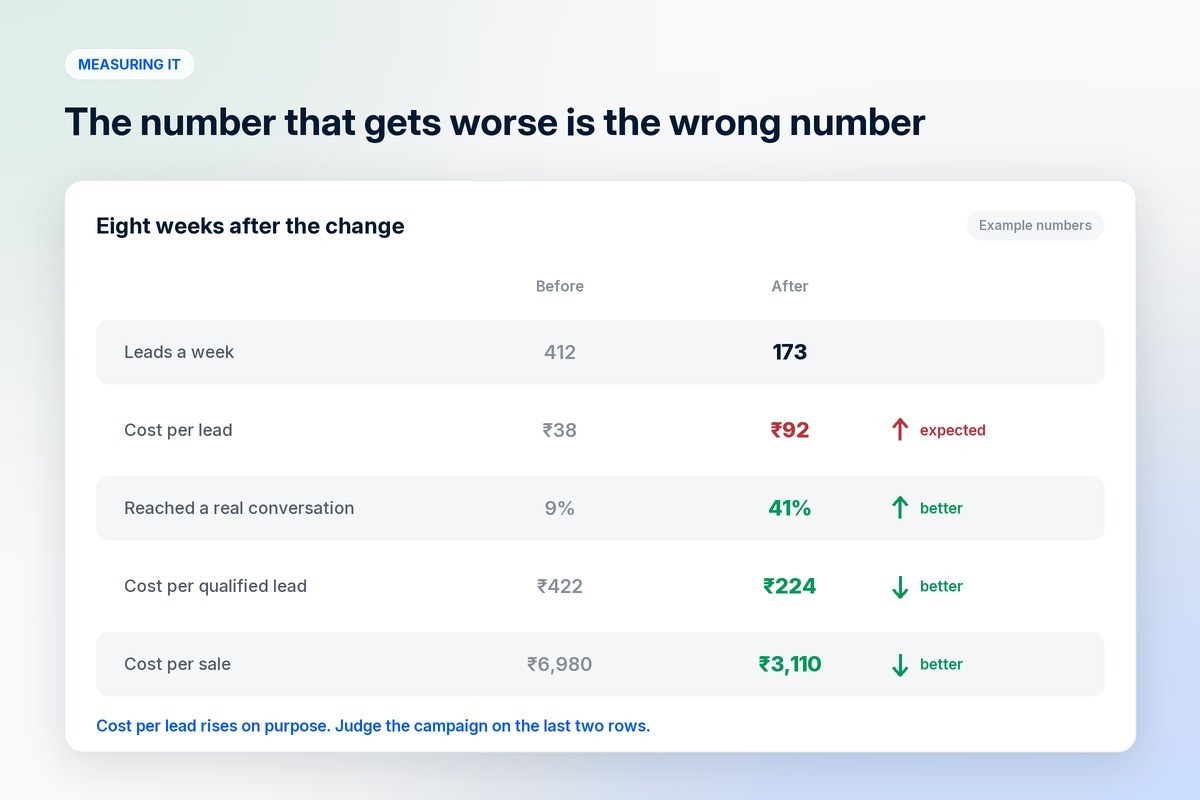
Track cost per qualified lead, using the definition you wrote in step one. Track the share of leads that reach a real conversation, which is the number sales actually feels. Track cost per sale, which is the only one that pays salaries.
Then look at the same numbers by ad. Creative changes who answers the phone more than most people expect. The ad that produced the cheapest leads is often not the ad that produced the customers, and you can only see that once outcomes are flowing back into the account.
Mistakes that cost the most
Judging the change in week one. The learning phase makes early numbers unstable, and a campaign killed on day four never got to show you anything.
Adding nine questions at once. You will filter the leads, but you will not know which question did it, and you will have made the form slow for the buyers too.
Leaving sales out of it. The team taking the calls knows which leads are wasting their time. They are your labelling system, and the CRM stage is how their knowledge gets back into the ad account.
Buying leads for a product that is not ready to be sold. If the landing page, the pricing and the follow-up are vague, better targeting just finds a more expensive way to lose the same people.
Frequently asked questions
What is lead quality in Meta ads?
Lead quality is the share of leads from a campaign that turn into something you wanted, such as an answered call, a quote request or a sale. A campaign can produce cheap leads and poor quality at the same time, which is why cost per lead on its own tells you very little.
Why are my Meta lead ads producing low-intent leads?
Usually because the ad set is set to maximise the number of leads and the form is set to more volume. Both defaults are built for volume, so the system finds the people most willing to submit a form, which is a different audience from the people most willing to buy.
How do I improve lead quality on Meta ads?
Define a qualified lead as a CRM stage, switch the performance goal to qualified leads, connect your CRM through the Conversions API so outcomes flow back, move the form to higher intent, add one filtering question, and follow up within minutes.
Who should use the higher intent form instead of more volume?
Any business that calls or messages every lead, and any business selling something expensive enough that a wasted conversation costs real time. Higher intent forms only run on mobile Facebook and Instagram feeds, so check that against where your audience sees your ads.
When should I expect lead quality to improve?
Give it two weeks of stable delivery after the last significant change. An ad set usually needs around 50 results in a week to exit the learning phase, and qualified lead events are rarer than form fills, so the first fortnight tells you less than it seems to.
Where do the lead outcomes come from?
From your CRM, pushed back to Meta through the Conversions API. Meta's documentation asks you to send an event for every status update during the learning phase, so the system learns from the leads that went nowhere as well as the ones that bought.
Where to go from here
The settings above assume the campaign structure underneath them is sane. If you are setting up Meta ads from scratch, start with how to set up Meta ads for D2C brands, which covers the account, the events and the first two weeks of spending. For how paid fits with everything else, there is what digital marketing is, and the organic side is in D2C social media marketing.
The follow-up half of this post is a product decision rather than an ad setting. 1D2C connects WhatsApp to the store so an enquiry can be answered automatically within seconds and the thread stays attached to the customer record, and our marketing plans include managed Meta campaigns and the creative in them. Both are on the pricing page.
Meta's form types, performance goals, Conversions API requirement and learning phase numbers above were checked on Meta's Business Help Centre in October 2026. Ad products change often, so check the current help pages before you plan a campaign. If the ads are boosted posts rather than campaigns, fix that first: Ads Manager vs the Instagram boost.