

Selling online is mostly the same work as running a shop. The difference is that every part of it has to happen through a screen.
To sell online, you choose what to sell and who to sell it to, set up a place to take orders (your own store, a marketplace or social media), arrange payments and delivery, and then bring buyers to you and give them reasons to come back. Those are the ten steps below.
Most people start further along than they think. A home baker in Indore was already selling online without calling it that: photos on her WhatsApp status, orders in her messages, payment by UPI and deliveries by her nephew on a scooter. What she lacked was a system. Orders got lost between chats, she could not take payment at midnight, and nobody outside her contacts could find her. Learning how to sell online properly meant turning that into something that runs without her answering every message.
Here is how to sell online, step by step, whether you are starting from zero or from a busy phone.
How to sell online in 10 steps
Choose what to sell.
Find your niche and check demand.
Know who you are selling to.
Decide where to sell.
Build your online store.
Set up payments.
Set up shipping and returns.
Market your products.
Build trust with reviews and policies.
Look after customers and grow.
1. Choose what to sell
The best products to sell online share a few traits. They are light enough to ship without the courier bill eating the margin. People buy them again, so one customer brings more than one order. They have something worth explaining, which a photo and a short video can show. And they leave enough margin to pay for shipping, payment fees, returns and ads.
You can make the product yourself, buy from a manufacturer or wholesaler, or sell something digital such as a course or a template. If you buy in, order samples first and start with a small batch, even at a higher unit price.
2. Find your niche and check demand
“Clothing” is a category. “Office kurtas for women that survive a washing machine” is a niche. A niche makes everything later easier: what to stock, how to describe it and where to advertise.
To check demand, search for the product the way a buyer would and see who already sells it. Read their reviews, especially the one-star ones. The complaints that keep coming up are the gap you can fill. Look at how they price, how they photograph, and what their delivery promise is.
3. Know who you are selling to
Write a short description of your buyer: who they are, what problem the product solves for them, where they spend time online and what would make them trust a brand they have never heard of. Keep it to a few lines. You will use it every time you write a product page, plan a post or set up an ad.
4. Decide where to sell online
There are three main places to sell online, and most businesses end up using more than one.
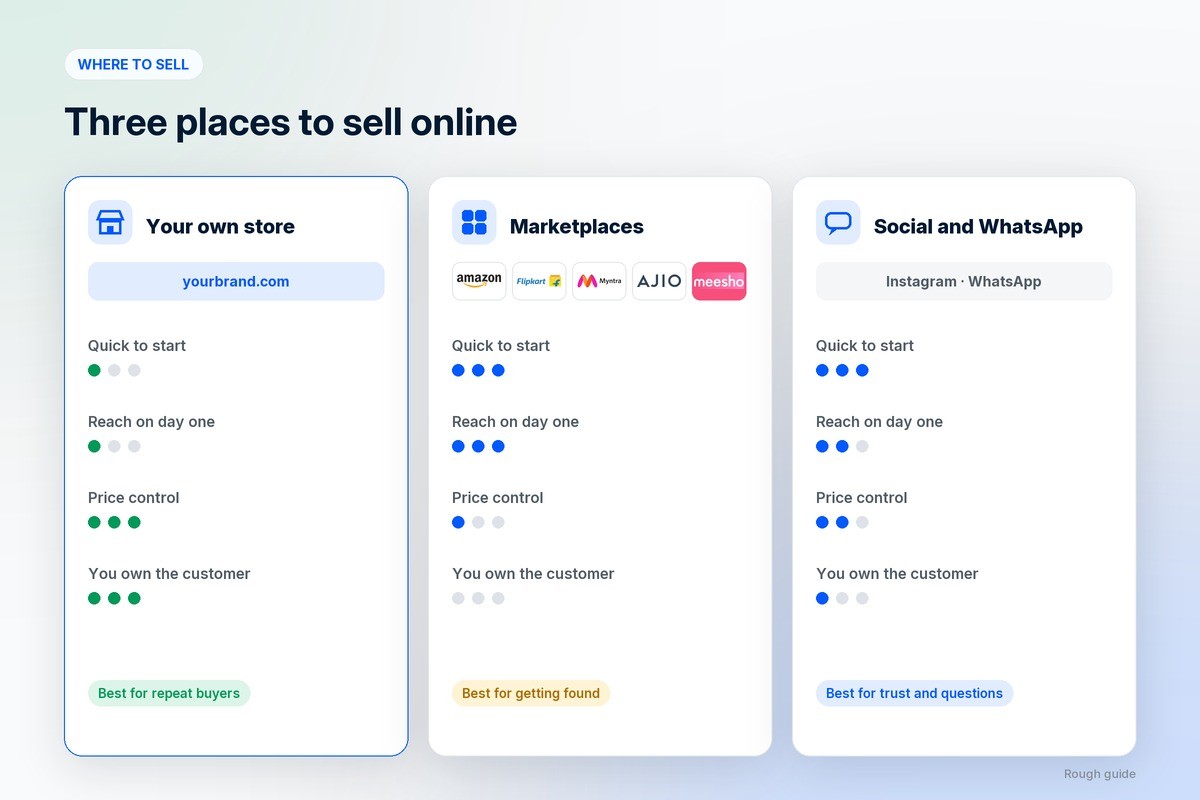
Your own online store: a website, and later an app, where you set the price, keep the customer’s details and decide how your brand looks.
Marketplaces such as Amazon, Flipkart, Myntra, Ajio and Meesho: traffic from day one, in exchange for commission, their rules, and customers who belong to the platform.
Social media and messaging: Instagram, Facebook and WhatsApp, where people discover you and ask questions before they buy.
A sensible mix uses social media and marketplaces to get found and your own store to keep the relationship. We explained the dangers of selling only on marketplaces in a separate post.
5. Build your online store
You do not need to write code to build an online store. An ecommerce website builder gets you a simple store quickly. If you need your own app, several sellers or your own delivery riders, an ecommerce platform for business covers those in one system.
Whichever you choose, a store that sells has the same basics:
A domain that matches your brand name.
Clear product photos, including the product in use, and honest descriptions with sizes and materials.
Prices and delivery dates shown before checkout, with no surprise charges at the end.
A checkout that works on a phone in a few taps.
Pages for returns, shipping, privacy and contact details.
Test the whole thing on your own phone before you tell anyone it exists.
6. Set up payments
Offer the ways your buyers already pay. In India that means UPI, cards, netbanking and wallets, and often cash on delivery. In most other markets it means cards and digital wallets, sometimes with a buy-now-pay-later option. A payment gateway handles this for you, and it needs your business documents before it approves your account, so apply early.
Think hard about cash on delivery. It brings in buyers who do not yet trust you, and it also brings parcels that come back unopened. Many stores offer it, then nudge buyers towards prepaid with a small discount or faster dispatch. Taxes and registrations depend on where you sell; the 7 things to do before you start an ecommerce brand covers the paperwork.
7. Set up shipping and returns
Decide how parcels will reach people before the first order arrives. Most small stores use one or two courier partners, and businesses that deliver locally often use their own riders as well. Then choose how you will charge for it:

A flat rate on every order, which is simple to understand.
Free shipping above a set order value, which raises the average order.
Rates calculated by weight and distance, which is fairer for heavy items.
Local delivery or pickup for buyers nearby.
Write a returns policy you can live with and that a nervous first-time buyer will find reassuring. Then walk one order through end to end, including a return and a refund, so you find the gaps before a customer does.
8. Market your products
A new store has no passing traffic, so you have to bring people to it. Learning how to sell online is mostly learning which of these channels works for your product:
Search: product pages and blog posts that answer what buyers type into Google. Slow to start, and it keeps working.
Social media: regular posts and reels on Instagram and Facebook, so the brand looks active and real.
Paid ads on Meta and Google, which bring buyers quickly and stop when the spending stops.
WhatsApp, for order updates, cart reminders and answering questions before someone buys.
Start with one or two you can keep up with. Our guides to digital marketing, social media and ads for ecommerce and WhatsApp for ecommerce go deeper on each.
9. Build trust with reviews and policies
Someone buying from a new store is sending money on a promise. Make the promise easy to believe. Ask every early customer for a review and a photo. Show delivery dates, the returns policy and a way to reach a person on every product page. Keep your name, logo and tone the same on the store, the parcel and the messages you send. We wrote about why branding is important for exactly this reason.
10. Look after customers and grow
The first order is the expensive one. The second is where an online business starts to make money, because you are no longer paying to find that customer.

Answer questions quickly, fix problems generously, and follow up after delivery. Watch a handful of numbers every week: visitors, orders, average order value, how many buyers come back, and what each new customer costs you in ads. Add products your existing buyers ask for, and an app once a good share of your orders come from repeat buyers.
What sells well online
Part of working out how to sell online is picking products that suit it. For inspiration, see our list of ecommerce business ideas. Instead of chasing a list of trending products, look for these traits:
Repeat purchase: consumables, refills, food, personal care and pet supplies.
Good margin after shipping, so a heavy or bulky product needs a high price to work.
Easy to ship without breaking.
Something to explain or show, which video and social media are good at.
A clear buyer, so you know where to find them.
Pros and cons of selling online
The advantages: you can reach buyers far beyond your street, sell at any hour, start with less money than a physical shop, and keep a record of every customer so you can sell to them again.
The drawbacks: buyers cannot touch the product, so trust takes work; shipping and returns cost money on every order; competition is a search away; and getting found usually means paying for ads until search and word of mouth catch up.
Common mistakes when you start selling online
Ordering a large first batch before anyone has bought the product.
Pricing from the product cost alone, without shipping, returns and ads.
Spending the whole budget on launch ads with nothing left to learn from them.
Selling only on one marketplace and never collecting a single customer’s details.
Taking days to answer questions, which loses the buyers who were ready.
How to sell online with 1D2C
1D2C builds your own website and branded buyer app, with seller and delivery apps to run orders behind them, so you can take payments, ship through couriers or your own riders, and send WhatsApp updates from one system. No commission is taken on any order, on any plan. Marketing and WhatsApp plans add a team that runs your posts, reels, ads and campaigns. Plans are on the pricing page.
Frequently asked questions
How do I start selling online?
Choose a product and a clear buyer, decide where to sell, set up a store with payments and delivery, write your returns policy, then start marketing on one or two channels you can keep up with.
Why should a business sell online?
To reach buyers beyond walking distance, take orders at any hour, and keep a record of every customer so you can sell to them again.
Where is the best place to sell online?
Most businesses do best with a mix: their own online store for repeat buyers and margin, plus social media and marketplaces to get found. Relying on one marketplace alone puts your sales in someone else’s hands.
Who can sell online?
Almost anyone: makers, shops, wholesalers, service businesses and people selling from home. Depending on your country and turnover, you may need a registered business and tax registration before you can take payments through a gateway.
How much does it cost to start selling online?
The main costs are your first stock, a store or platform plan, payment gateway fees, shipping, and marketing. Marketing is the part people underestimate, so budget for at least the first two or three months of it.
When will I make my first sale online?
It can be days if you already have an audience on social media or WhatsApp, and weeks or months if you are starting from zero and relying on search. Ads speed it up, at a cost.
How to sell online from home?
Start with products you can make or store at home, take orders through your own store and WhatsApp, book courier pickups from your door, and set aside one tidy area for packing so orders do not get mixed up.
Can I sell online without holding stock?
Yes. Dropshipping, print-on-demand and digital products let you sell without keeping inventory. The trade-off is lower margins and less control over quality and delivery times.
Do I have to pay tax on what I sell online?
Usually, yes. The rules depend on where you are based, where your buyers are and how much you sell. An accountant who works with online sellers can tell you what applies to you.
Where to go from here
If you are still deciding whether to sell direct, start with what D2C means and what ecommerce is. When you are ready to set up, compare options in our guides to the ecommerce website builder and the ecommerce platform for business. Plans are on the pricing page. For the catalogue side in depth, including variants, bulk CSV imports and migration, see how to sell physical products online.